
Digital files can take up a surprising amount of storage space. A folder containing hundreds of photographs, documents, spreadsheets, or other files can quickly grow to several gigabytes. Uploading these files to a website, attaching them to an email, or transferring them between devices may take time, especially when internet speeds are limited.
File compression helps solve this problem by reducing the amount of data needed to represent a file. One of the most familiar examples is the ZIP file, a format that allows computers to store one or more files in a compressed archive.
But how can a computer make a file smaller without necessarily removing any of its contents? The answer lies in how computers represent information, identify repeated patterns, and encode data more efficiently.
What Is File Compression?
File compression is the process of reducing the amount of digital data required to store or transmit information.
Every digital file consists of data represented in binary form, using combinations of zeros and ones. A text document, for example, contains encoded characters, while a photograph contains information about pixels, colors, and image details. Although these files may look completely different to a person, a computer processes them as sequences of data.
Compression algorithms analyze these sequences and look for ways to represent the same information with fewer bits.
There are two main types of file compression:
- Lossless compression: Reduces file size without permanently removing information. The original data can be reconstructed exactly.
- Lossy compression: Reduces file size by discarding some information, usually information considered less important to human perception.
ZIP files typically use lossless compression. When a compressed text document is extracted, its original contents can be recovered exactly, including every character and punctuation mark.
Lossy compression is more common in formats such as JPEG images, MP3 audio, and certain video formats. These formats can achieve much greater size reductions by accepting some loss of information.
Why Does Repeated Data Make a File Larger Than Necessary?
One of the fundamental principles behind compression is that digital files often contain patterns that can be represented more efficiently.
Consider this example:
AAAAAAAAAAAAAAAAAAAAAAAA
The sequence contains 24 identical letters. Storing every letter separately is one way to represent the data, but it is not the only way.
A compression algorithm could represent the sequence as:
24 × A
This shorter representation communicates the same information: repeat the letter A 24 times.
A real compression algorithm uses more sophisticated methods than this simple example, but the principle is similar. When data contains repetition, the algorithm can often replace repeated information with a more compact representation.
Repetition appears in many forms. A text document may contain frequently used words, spaces, punctuation marks, or common letter combinations. A spreadsheet may repeat the same values across numerous rows. A program file may contain recurring instructions or structures.
These patterns create opportunities for compression.
However, not every file contains enough repetition to become significantly smaller. Random-looking data may have few patterns that can be represented more efficiently, which limits the potential for compression.
How ZIP Compression Works
A ZIP archive is more than a smaller version of a file. It is a container that can organize multiple files and folders while applying compression where appropriate.
When a user creates a ZIP file, the computer generally performs several operations.
1. The Computer Reads the Original Data
The compression process begins by reading the contents of the selected files.
Depending on the file type and compression method, the algorithm may examine sequences of bytes, repeated patterns, and frequently occurring combinations of data.
For example, a text file containing several pages of similar sentences may include many repeated character sequences. The algorithm searches for opportunities to represent these sequences more efficiently.
2. The Algorithm Identifies Repeated Patterns
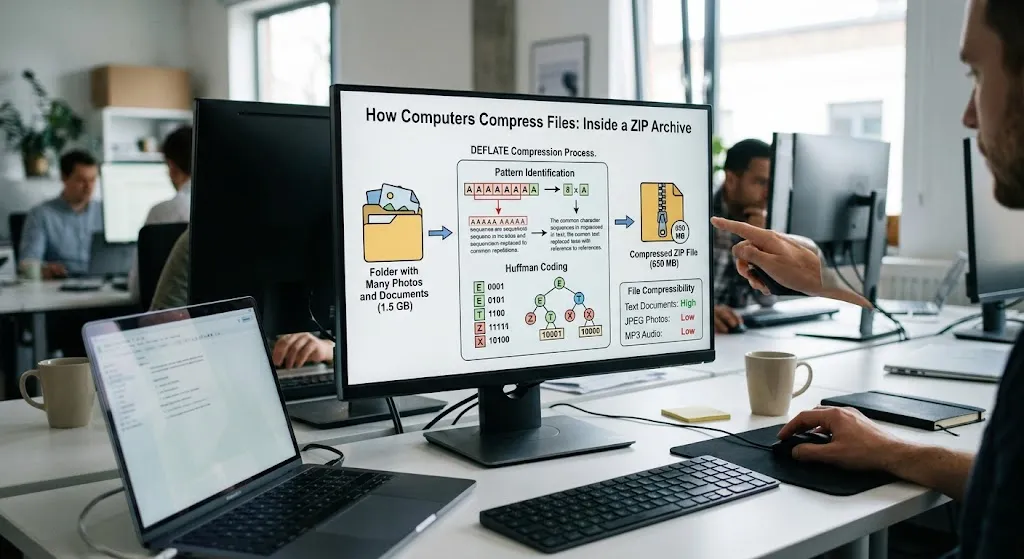
Many ZIP archives use the DEFLATE compression algorithm, which combines two important techniques: LZ77-style pattern matching and Huffman coding.
The first technique looks for repeated sequences of data. Instead of storing the same sequence multiple times, the algorithm can refer back to an earlier occurrence.
Imagine a document containing the phrase “computer storage” hundreds of times. Once a particular sequence has appeared, a compression algorithm may be able to encode later repetitions using a reference to the earlier data rather than storing the complete sequence again.
The actual implementation works with byte sequences and distance-length references rather than simply replacing repeated English phrases.
This technique is particularly useful when files contain recurring patterns separated by other data.
3. The Data Is Encoded More Efficiently
After identifying patterns, the algorithm can use another technique called Huffman coding.
Huffman coding assigns shorter bit sequences to symbols that occur more frequently and longer sequences to symbols that occur less frequently.
Suppose a document contains the letter E many times but uses the letter Z only occasionally. An appropriate coding scheme can represent E with fewer bits than Z while still preserving the ability to distinguish every symbol.
This is similar to an efficient communication system in which common messages receive shorter codes.
The exact codes depend on the data being compressed. A frequency-based coding scheme is constructed so that the encoded symbols can be decoded unambiguously.
DEFLATE combines pattern references and Huffman coding to reduce the amount of data required to represent the original information.
4. The ZIP Archive Stores the Compressed Data and Its Structure
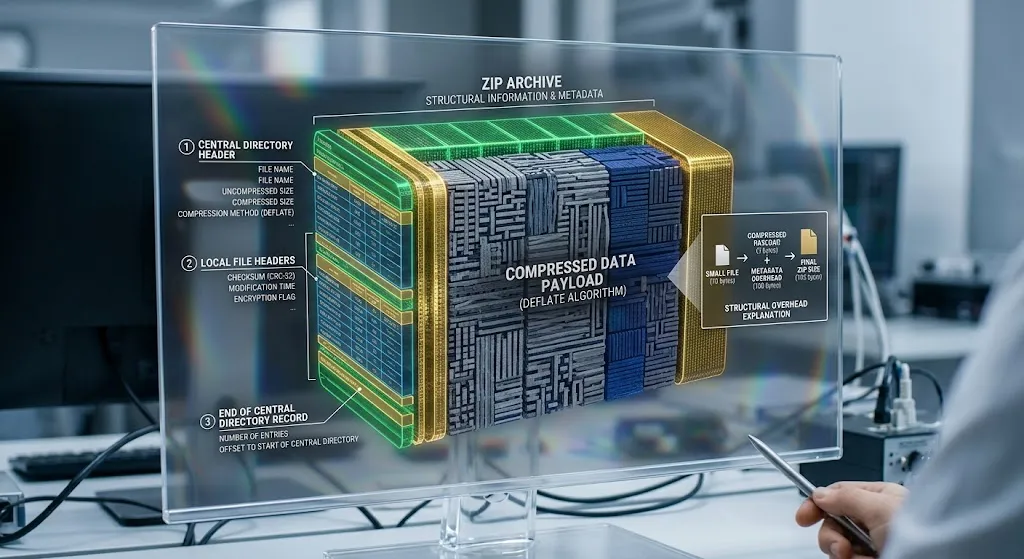
A ZIP file also contains information needed to manage the archive.
This can include file names, file sizes, compression methods, checksums, and other metadata. The archive maintains the information necessary to identify its contents and extract individual files.
As a result, the final ZIP file is not simply the compressed data alone. It includes some additional structural information, which is one reason very small files may not become smaller when compressed.
5. The Computer Reconstructs the Original Files
When someone extracts a ZIP archive, the computer reverses the compression process.
It reads the encoded data, interprets the pattern references, decodes the symbols, and reconstructs the original file contents.
With lossless compression, the extracted files contain exactly the same data as the originals.
This is the key difference between compression and deletion: compression changes how information is represented, not the information that must ultimately be recovered.
A Simple Example of How Compression Saves Space
Imagine a text file containing the following sequence repeated many times:
ABCABCABCABCABCABC
Instead of storing each occurrence independently, a compression algorithm may identify repeated sequences and encode them using references to earlier data.
For illustration, suppose the original file requires 18 bytes, while the compressed representation of the repeating pattern requires only 7 bytes. The data reduction would be:
[
\frac{18-7}{18}\times100 \approx 61.1%
]
This is a simplified example intended to demonstrate the mathematics of compression. Actual ZIP output depends on the algorithm, the complete file contents, and the overhead required to store compression information.
The important point is that repeated information can often be represented using fewer bits.
Why Some Files Compress Much Better Than Others
Not all files respond to compression in the same way. The result depends largely on how the information is already encoded.
Text Documents
Text files often compress well because they contain repeated words, character sequences, spaces, and predictable structures.
A large plain-text document, log file, or uncompressed data export may become substantially smaller when placed in a ZIP archive.
Documents containing repeated tables or similar records can also benefit from compression.
Spreadsheets and Structured Data
Spreadsheets may contain repeated labels, similar formulas, recurring numbers, and predictable formatting structures. These patterns can make some spreadsheet data highly compressible.
However, modern spreadsheet formats such as XLSX already use ZIP-based packaging and compression internally. Compressing an XLSX file again may therefore produce only a small reduction.
Photographs
Photographs saved as JPEG files have usually undergone lossy compression already. Their data has been transformed to reduce the amount of information required to represent the image.
Putting a JPEG photograph into a ZIP archive may save little additional space because much of the original redundancy has already been removed.
The same principle applies to many modern image formats that use effective compression methods.
Audio and Video
MP3 audio, AAC audio, MP4 video, and similar formats already use specialized compression techniques.
A ZIP archive generally cannot reduce these files dramatically because the underlying data is already encoded efficiently.
Uncompressed audio and video, however, can sometimes benefit significantly from compression, depending on their characteristics and the algorithm used.
Programs and Software Files
Program files vary in compressibility. Some executable files and software packages contain repeated structures or other patterns that allow further compression.
Others are already compressed or contain data that is difficult to compress. Files containing encrypted or highly compressed information often offer very little additional reduction.
Does a ZIP File Always Become Smaller?
No. Creating a ZIP file does not guarantee a reduction in size.
Compression algorithms must store the information required to reconstruct the original data. ZIP archives also require metadata and structural information. For small files, this extra information can outweigh any savings achieved through compression.
For example, a tiny text file containing only a few characters may become larger when placed in a ZIP archive.
Files containing random data are another challenge. If an algorithm cannot find useful patterns, it may be unable to produce a shorter representation.
Most compression systems must also avoid expanding data unnecessarily or may use storage methods that leave certain files uncompressed. The precise behavior depends on the software and compression settings.
For this reason, the result of compression is determined by the characteristics of the original data, not simply by the number of files being archived.
ZIP Compression Versus File Archiving
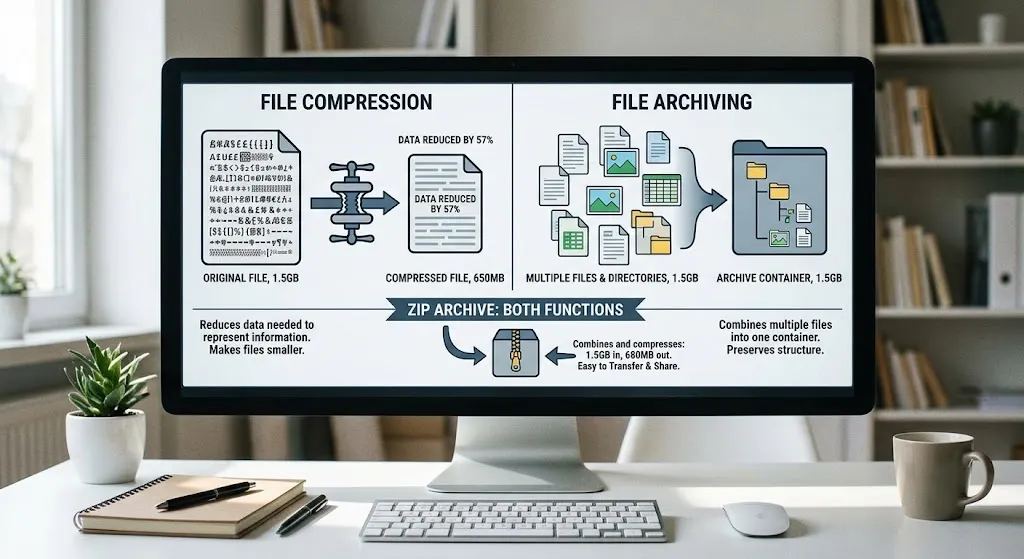
Compression and archiving are related, but they are not the same thing.
Compression reduces the amount of data required to represent information.
Archiving combines files and directories into a single container and preserves their organization.
A ZIP archive can perform both functions. It can collect dozens of documents into one file while compressing their contents.
Some archive formats can also store files without compressing them. Similarly, certain compression tools can compress a single file without combining it with others.
This distinction explains why creating a ZIP archive can be useful even when the file size barely changes. A folder containing many documents becomes easier to transfer, attach to an email, or distribute as one package.
How ZIP Files Preserve Data Integrity
Compression must not only reduce file size but also preserve the original information reliably.
ZIP archives commonly include checksums, such as CRC-32 values, that help detect accidental changes or corruption in stored data.
When a file is extracted, software can compare the calculated checksum with the value recorded in the archive. A mismatch indicates that the data may have changed or become corrupted.
Checksums are useful for detecting many accidental errors, but they are not a guarantee against every possible problem and are not a substitute for cryptographic authentication.
ZIP compression also does not automatically encrypt the contents of an archive. A standard ZIP file may contain readable information after extraction, and anyone who obtains the archive may be able to access its contents.
When confidentiality matters, users should choose an appropriate encryption method rather than assuming that compression provides security.
Compression and Decompression: What Happens Inside the Computer?
Compressing and extracting files require processing power and memory.
During compression, the computer analyzes the data, searches for repeated patterns, constructs or uses coding tables, and writes the resulting representation to the archive. More intensive compression settings may require additional computation to find better ways to encode the data.
Decompression usually involves reading the encoded representation and reversing the transformations. Because the algorithm’s instructions and references are stored in the compressed data, the computer can reconstruct the original file without needing to search for the original information elsewhere.
Compression therefore involves a trade-off between file size and processing time.
A faster compression setting may produce a larger archive, while a slower setting may find more opportunities to reduce its size. The exact difference depends on the algorithm, software, and data.
For everyday documents, the time savings from transferring a smaller archive may outweigh the time spent compressing and extracting it.
Why Compression Matters for the Internet and Digital Storage
File compression has become an important part of modern computing because digital systems constantly move and store large amounts of information.
Smaller files can reduce upload and download times when network speed is the limiting factor. They can also reduce storage requirements, simplify backups, and make large collections of documents easier to distribute.
Web technologies use compression as well. Web servers can compress text-based responses, including HTML, CSS, and JavaScript, so that browsers receive fewer bytes over the network. Formats and protocols such as gzip, Brotli, and Zstandard use compression techniques for different applications.
Cloud storage and backup systems may also use compression to reduce the amount of data that must be stored or transmitted, although the exact benefits depend on the service and the files involved.
Compression is not a universal solution. Processing has a cost, and already-compressed files may offer little additional savings. Nevertheless, it remains one of the most practical ways to make digital information more efficient to store and transfer.
Can Compression Reduce the Size of Every File?
No. Compression is most effective when the original data contains patterns or redundancy that can be represented more efficiently.
Plain-text documents, repetitive logs, and certain structured datasets often compress well. JPEG images, MP3 audio, MP4 videos, and many other already-compressed formats may show little improvement.
In some cases, the compressed representation can be larger than the original because of metadata and encoding overhead.
Key Takeaways
- File compression reduces the amount of data needed to represent digital information.
- ZIP archives commonly use the lossless DEFLATE algorithm, which combines repeated-pattern matching with Huffman coding.
- Lossless compression allows the original files to be reconstructed exactly.
- Text documents and repetitive data often compress better than files already stored in compressed formats.
- A ZIP archive can organize multiple files even when it does not significantly reduce their total size.
- Compression requires processing power, and stronger compression may take longer.
- ZIP compression does not automatically protect files with encryption.
Frequently Asked Questions
A ZIP file can be smaller because its compression algorithm identifies repeated patterns and represents data more efficiently. The savings depend on the file contents and the compression method.
No, not when using standard lossless ZIP compression. Extracting the archive restores the original data exactly. The quality of a photograph, document, or other file is not reduced by lossless compression.
Some files, including JPEG photographs and MP3 audio, are already compressed. Their data contains fewer easily exploitable patterns, so ZIP compression may offer little additional reduction.
No. Compression reduces file size, while encryption transforms information to prevent unauthorized access without the appropriate key. A ZIP archive can support encryption, but creating an ordinary ZIP file does not necessarily encrypt its contents.
A ZIP file is a common choice when you want to distribute or transfer a collection of files as one package. A compressed folder may be convenient for storage, but the best option depends on the operating system, software compatibility, security requirements, and desired compression level.
Sometimes, but usually not by much. If the archive already contains compressed data, another compression pass is unlikely to find many additional patterns. Repeatedly compressing the same ZIP file may even increase its size.
Conclusion
A ZIP file is smaller not because the computer removes essential information, but because it finds a more efficient way to represent that information. By identifying repeated sequences, encoding common patterns economically, and recording the structure needed for reconstruction, compression algorithms can reduce the space required by many types of digital files.
The same principle underlies many everyday computing technologies, from smaller email attachments to faster web pages and more efficient data storage. Whenever information contains patterns that can be represented more compactly, compression offers a way to preserve the original data while using fewer digital resources.




One thought on “How Computers Compress Files: Why a ZIP File Is Smaller”